Rust black holo: a holo sight you can see on snow
Updated · PixelForge team
The red dot of the holo sight is one of the best close and mid range sights in Rust, until you aim at snow, a sunset sky or a player in red or orange. Then the dot blends into the target and you lose it exactly when it matters. PixelForge Black Holo fixes that by turning the dot dark while you aim, and only while you aim.
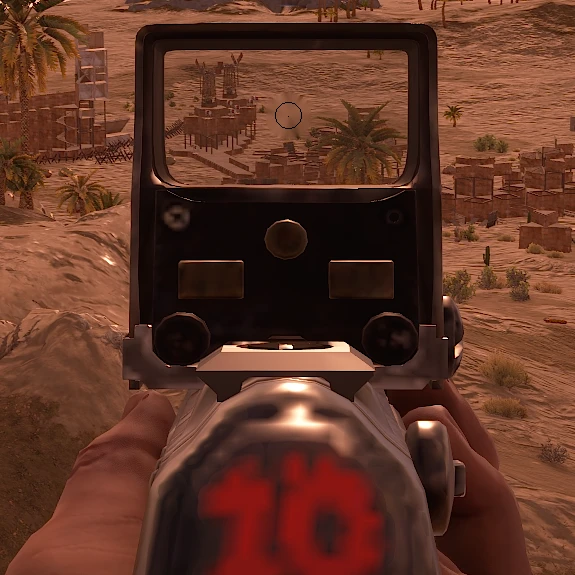
Why the red holo dot disappears
A red reticle is easy to see against green grass or grey rock, because red and green sit far apart. Against bright snow the dot is drowned in glare, and against red or orange targets, sunsets and burning structures it has almost no contrast at all. The result is the most common holo complaint in Rust: you aim, and the dot is simply gone.
Rust has no setting to change the reticle color, so most players either switch sights or live with it.
How Black Holo works
- The red dot turns dark into a thin, smooth dark ring, so it stands out against snow, sky and red or orange targets.
- Only while you aim. It turns on while you hold right mouse in a game. The rest of the time your screen is completely normal.
- Only around the dot. A small spot around the reticle changes. Every other color on your screen stays as it is, including your scene looks and Night Vision.
- One switch. Turn it on in the Filters page next to Night Vision. There is nothing to tune.
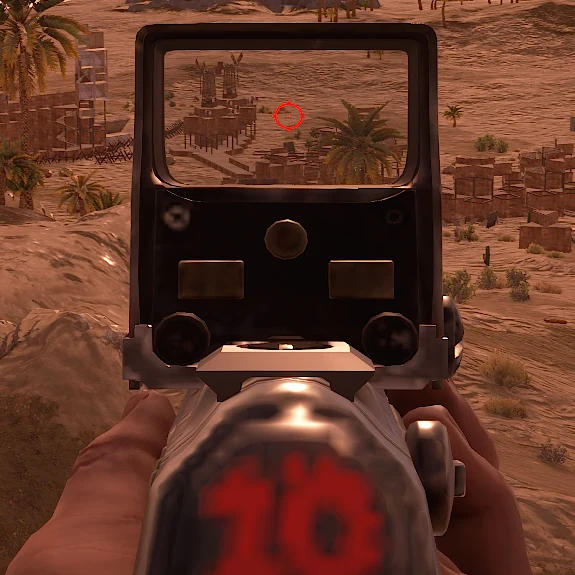
Compare both versions with the slider in the Black holo section of the homepage or in the web simulator.
Nothing touches the game
Black Holo works on the Windows display, the same level as your monitor's own settings. PixelForge does not inject into Rust, does not change game files and does not read or write game memory. It needs Rust in borderless or windowed mode, because Windows cannot draw on top of exclusive fullscreen.
Black Holo with the other Rust tools
- Rust scene looks: Snow, Desert, Green and Metro color mixes on a hotkey. See Rust scene filters.
- Night Vision: Dusk, Night and Pitch Black strengths. See Rust night vision.
- Zoom lens: a crosshair inside the lens and Ultra Zoom. See zoom and crosshair overlay.
Want to see it before you download anything? Open the free web simulator and drag the slider on real Rust frames.
Try it on your own PC
PixelForge is a single signed .exe for Windows 10 and 11. Nothing to install, updates itself when your PC is idle, and your settings follow your key to any PC.
Try free for 24h on Discord Get access from $5
30 days for $5 or Lifetime for $15 once. Pay with USDT on Tron (TRC20) or Solana and your key appears instantly. 7-day refund promise if it won't run on your PC and support can't fix it.
Questions
How do I see my red holo on snow in Rust?
Rust cannot change the reticle color. PixelForge Black Holo turns the red dot into a dark ring while you hold right mouse, so it stays visible against bright snow and red or orange targets.
Does Black Holo change the rest of my screen?
No. Only a small spot around the dot changes, and only while you aim. Every other color stays normal.
Does Black Holo work in fullscreen?
Use borderless or windowed mode. Windows overlays cannot draw on top of exclusive fullscreen.
Is Black Holo a cheat?
It changes how your screen looks and does not touch Rust, its files or its memory. Some servers ban overlays, so check the rules of the server you play on.
Is it safe?
PixelForge does not inject into games, touch game files or read game memory. It only changes how your screen looks and draws overlays. No tool can promise what every anti-cheat or server admin will accept, and some Rust servers ban external zoom tools, so check the rules and leave those features off if you are not sure.
More PixelForge features
- How to see at night in Rust: a night filter without purple shadows
- Rust scene filters: the best Rust color settings on a hotkey
- Stretched resolution in one click for Rust, CS2 and Fortnite
- Zoom lens and custom crosshair overlay for PC games
- PixelForge Lite: a free crosshair overlay and FPS counter
- PixelForge vs VibranceGUI, Crosshair X, HudSight and NVIDIA filters